AI Demo
Five deliberately ordinary-looking internal apps at Horizon Inc, each with its own API and MCP server, and each one configured to leak data to an AI agent that circumvents the applications access controls.
This is the guide to a Cloudflare AI security demo. Horizon Inc is a fake example company and the apps are designed to look real. The data in them is entirely synthetic. Every gap an agent can walk through here is deliberate, documented, and closed by a Cloudflare control on the protection page.
Every control here exists because of a published incident, and each one is cited on the real incidents page — EchoLeak against Microsoft 365 Copilot, the Gemini calendar-invite research, Samsung's engineers and ChatGPT, Asana's MCP server crossing tenants, GitHub MCP and DeepSeek's open database.
What the deploy scripts build
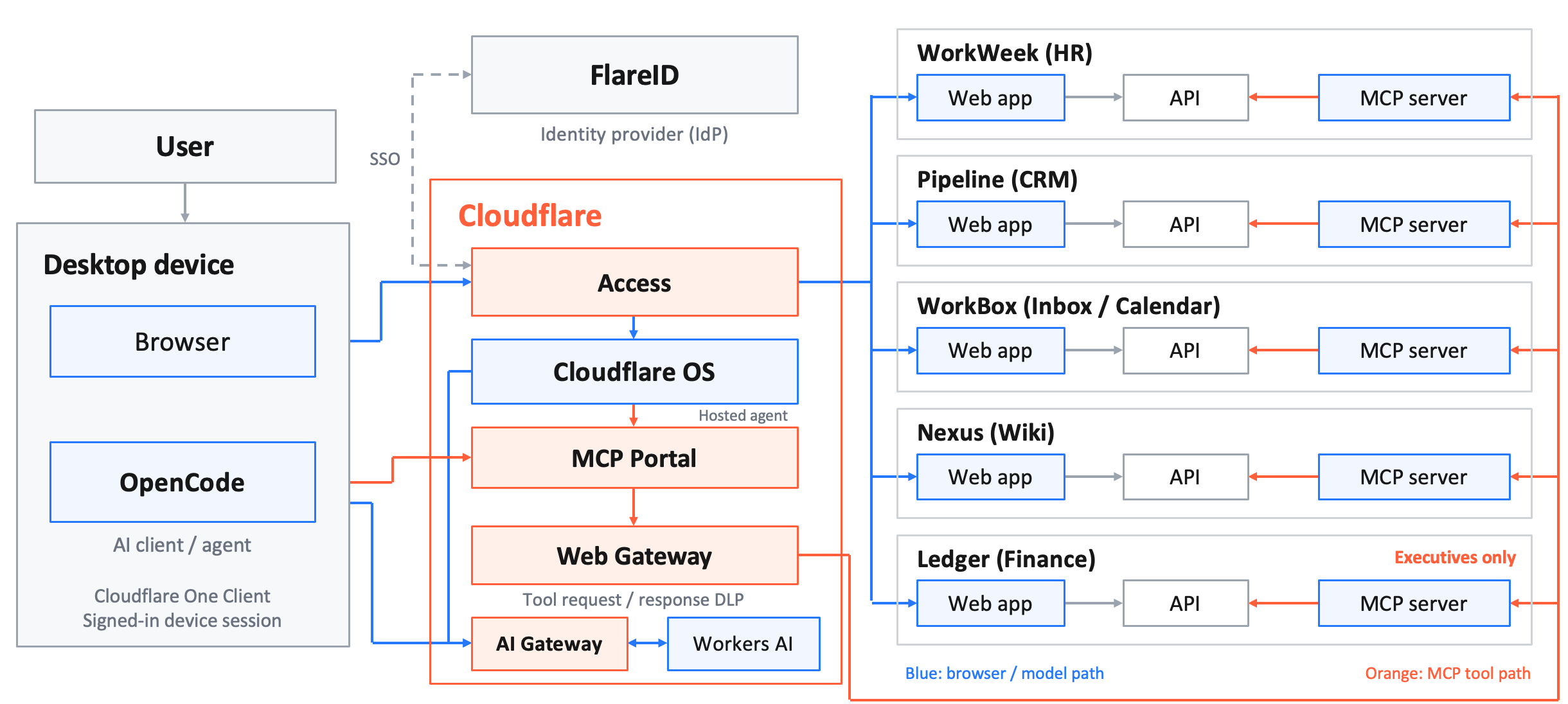
./deploy.sh, except the hosted agent, which is
optional. The two arrow colours are the point of the whole demo: the
blue path is what the person can reach, the orange path is what
their agent can reach, and they arrive at the same APIs by different routes.Each application has a web app and an API that have been careful about access control for years, and then an MCP server has been deployed beside them and is not equally careful. The five Cloudflare boxes in the middle are the controls on the protection page, and every one of them sits in the path rather than inside an application.
The apps
| App | What it holds | MCP server |
|---|---|---|
| WorkWeek (HR) | People, pay, reviews, home addresses, HR case notes | |
| Pipeline (CRM) | Accounts, contacts, deals, forecast and margin | |
| WorkBox (Inbox/Calendar) | Mail, calendar, an archived exec distribution list | |
| Nexus (Wiki) | Public and restricted spaces, exec planning, strategy | |
| Ledger (Finance) | Cost centres, payroll runs, the board pack — Executives only | |
| FlareID | The identity provider behind Cloudflare Access for all of the above | — |
The demo personas
Alice Watson
Content Strategist, Marketing. Reports to Art Schowalter-Haag (VP Marketing). Joined 2016.
Sign in as alice.watson@company.com — password Savetheinternet!1.
In the web UI Alice can see the staff directory, her own pay and profile, her own mailbox and calendar, and the public wiki spaces. She owns no CRM accounts and is not a member of any restricted wiki space.
Nikita Chapman
Chief Executive Officer. The person most of the intentional-misuse prompts are aimed at.
Her home address, pay, calendar, and the board material she is working on are all things Alice has no route to in any of the web apps she can open.
Demo narratives
Project Ironwood
A confidential acquisition, mid-diligence. It shows up as an Executive wiki page, a CRM account and deal, a run of calendar entries, and an exec mail thread — so an agent can reconstruct most of it from pieces that each look harmless on their own.
The Q1 restructure
A planned reduction in Marketing, with a named list. It shows up as HR case notes and severance figures, "planning" meetings on the exec calendar, and a restricted People-space wiki page. Alice's own team is on the list.
How to run the demo
- The data — what each app holds, and exactly which of it the API and MCP servers hand out that the web UI never will.
- Setup — point opencode at the MCP portal and at a model behind AI Gateway, with the two settings that stop the agent wasting a dozen steps looking for its tools.
- Demo scripts — eleven scripted prompts, single-app and cross-app, intentional and accidental, plus one indirect prompt injection.
- Protection — what gets deployed when the protection layer is turned on, and which control stops which prompt.
The same repo deploys either just the apps and their Access configuration (the "before" state, where every prompt below succeeds), or the apps plus AI Gateway, DLP profiles, an MCP server portal routed through Gateway, and the Gateway rules that stop them. Flip between them by re-running one script — see protection.